Prompts
简介
Laravel Prompts 是一个 PHP 包,可为命令行应用添加美观、易用的表单,具备占位符与验证等类似浏览器的特性。
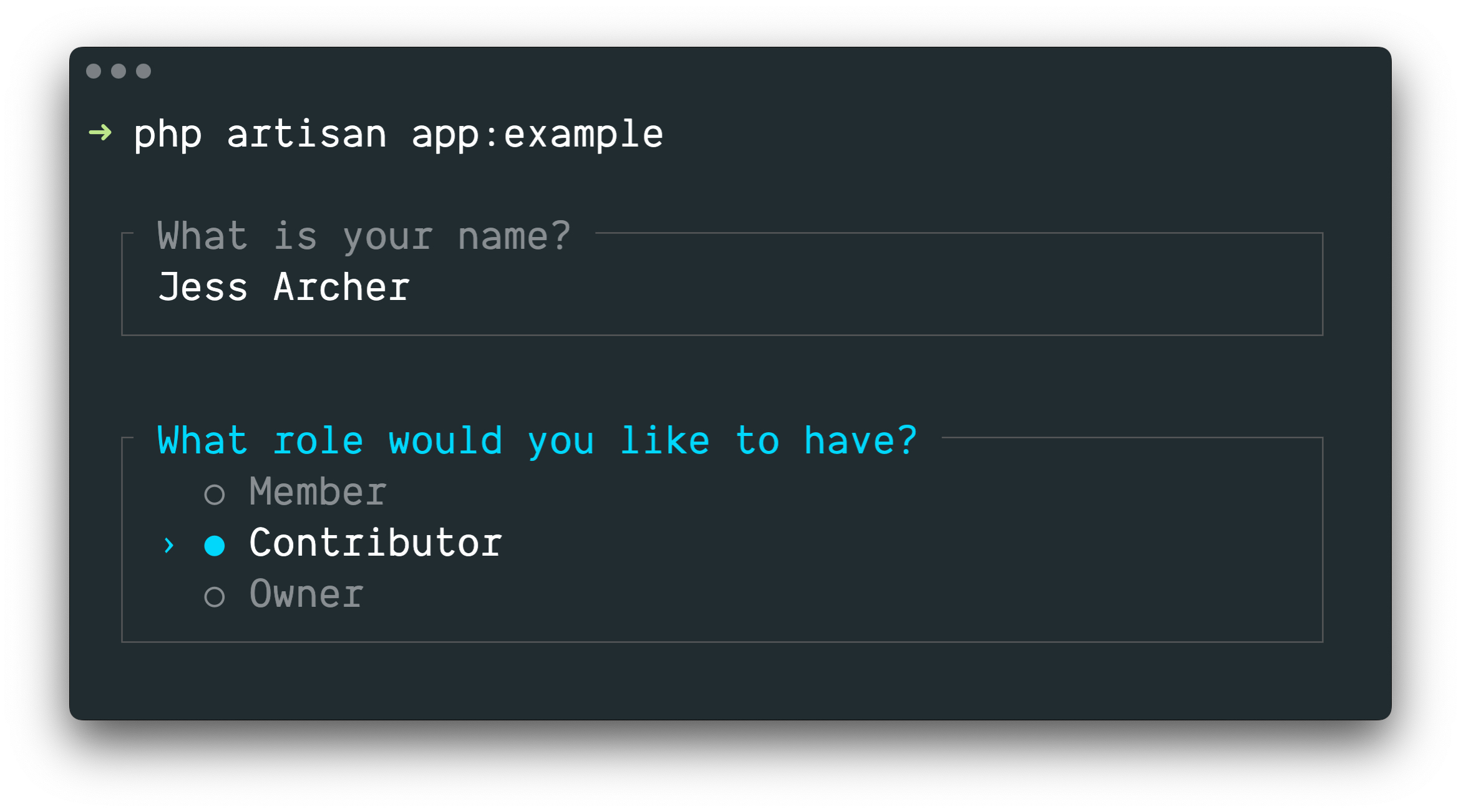
Laravel Prompts 非常适合在 Artisan 控制台命令 中接收用户输入,也可用于任何命令行 PHP 项目。
INFO
Laravel Prompts 支持 macOS、Linux 及带 WSL 的 Windows。更多信息请参阅不支持的环境与回退文档。
安装
最新版 Laravel 已内置 Laravel Prompts。
也可通过 Composer 在其他 PHP 项目中安装 Laravel Prompts:
composer require laravel/prompts可用提示
文本
text 函数会以给定问题提示用户,接收输入并返回:
use function Laravel\Prompts\text;

$name = text('What is your name?');
还可包含占位符、默认值与信息提示:
$name = text(
    label: 'What is your name?',
    placeholder: 'E.g. Taylor Otwell',
    default: $user?->name,
    hint: 'This will be displayed on your profile.'
);
必填值
若要求必须输入值,可传入 required 参数:
$name = text(
    label: 'What is your name?',
    required: true
);
若要自定义验证消息,也可传入字符串:
$name = text(
    label: 'What is your name?',
    required: 'Your name is required.'
);
额外验证
最后,若要执行额外验证逻辑,可向 validate 参数传入闭包:
$name = text(
    label: 'What is your name?',
    validate: fn (string $value) => match (true) {
        strlen($value) < 3 => 'The name must be at least 3 characters.',
        strlen($value) > 255 => 'The name must not exceed 255 characters.',
        default => null
    }
);
闭包接收已输入的值,验证失败可返回错误消息,通过则返回 null。
也可利用 Laravel 验证器:向 validate 参数提供包含属性名与验证规则的数组:
$name = text(
    label: 'What is your name?',
    validate: ['name' => 'required|max:255|unique:users']
);
多行文本
textarea 函数会以给定问题提示用户,通过多行文本框接收输入并返回:
use function Laravel\Prompts\textarea;

$story = textarea('Tell me a story.');
还可包含占位符、默认值与信息提示:
$story = textarea(
    label: 'Tell me a story.',
    placeholder: 'This is a story about...',
    hint: 'This will be displayed on your profile.'
);
必填值
若要求必须输入值,可传入 required 参数:
$story = textarea(
    label: 'Tell me a story.',
    required: true
);
若要自定义验证消息,也可传入字符串:
$story = textarea(
    label: 'Tell me a story.',
    required: 'A story is required.'
);
额外验证
最后,若要执行额外验证逻辑,可向 validate 参数传入闭包:
$story = textarea(
    label: 'Tell me a story.',
    validate: fn (string $value) => match (true) {
        strlen($value) < 250 => 'The story must be at least 250 characters.',
        strlen($value) > 10000 => 'The story must not exceed 10,000 characters.',
        default => null
    }
);
闭包接收已输入的值,验证失败可返回错误消息,通过则返回 null。
也可利用 Laravel 验证器:向 validate 参数提供包含属性名与验证规则的数组:
$story = textarea(
    label: 'Tell me a story.',
    validate: ['story' => 'required|max:10000']
);
数字
number 函数会以给定问题提示用户,接收数字输入并返回。用户可用上下方向键调整数字:
use function Laravel\Prompts\number;

$number = number('How many copies would you like?');
还可包含占位符、默认值与信息提示:
$name = number(
    label: 'How many copies would you like?',
    placeholder: '5',
    default: 1,
    hint: 'This will be determine how many copies to create.'
);
必填值
若要求必须输入值,可传入 required 参数:
$copies = number(
    label: 'How many copies would you like?',
    required: true
);
若要自定义验证消息,也可传入字符串:
$copies = number(
    label: 'How many copies would you like?',
    required: 'A number of copies is required.'
);
额外验证
最后,若要执行额外验证逻辑,可向 validate 参数传入闭包:
$copies = number(
    label: 'How many copies would you like?',
    validate: fn (?int $value) => match (true) {
        $value < 1 => 'At least one copy is required.',
        $value > 100 => 'You may not create more than 100 copies.',
        default => null
    }
);
闭包接收已输入的值,验证失败可返回错误消息,通过则返回 null。
也可利用 Laravel 验证器:向 validate 参数提供包含属性名与验证规则的数组:
$copies = number(
    label: 'How many copies would you like?',
    validate: ['copies' => 'required|integer|min:1|max:100']
);
密码
password 函数类似 text,但用户在控制台输入时会被掩码显示,适用于密码等敏感信息:
use function Laravel\Prompts\password;

$password = password('What is your password?');
还可包含占位符与信息提示:
$password = password(
    label: 'What is your password?',
    placeholder: 'password',
    hint: 'Minimum 8 characters.'
);
必填值
若要求必须输入值,可传入 required 参数:
$password = password(
    label: 'What is your password?',
    required: true
);
若要自定义验证消息,也可传入字符串:
$password = password(
    label: 'What is your password?',
    required: 'The password is required.'
);
额外验证
最后,若要执行额外验证逻辑,可向 validate 参数传入闭包:
$password = password(
    label: 'What is your password?',
    validate: fn (string $value) => match (true) {
        strlen($value) < 8 => 'The password must be at least 8 characters.',
        default => null
    }
);
闭包接收已输入的值,验证失败可返回错误消息,通过则返回 null。
也可利用 Laravel 验证器:向 validate 参数提供包含属性名与验证规则的数组:
$password = password(
    label: 'What is your password?',
    validate: ['password' => 'min:8']
);
确认
若需向用户确认「是或否」,可使用 confirm 函数。用户可用方向键或按 y/n 选择,函数返回 true 或 false。
use function Laravel\Prompts\confirm;

$confirmed = confirm('Do you accept the terms?');
还可包含默认值、自定义「是」「否」标签文案与信息提示:
$confirmed = confirm(
    label: 'Do you accept the terms?',
    default: false,
    yes: 'I accept',
    no: 'I decline',
    hint: 'The terms must be accepted to continue.'
);
要求选择「是」
如有必要,可传入 required 参数要求用户必须选择「是」:
$confirmed = confirm(
    label: 'Do you accept the terms?',
    required: true
);
若要自定义验证消息,也可传入字符串:
$confirmed = confirm(
    label: 'Do you accept the terms?',
    required: 'You must accept the terms to continue.'
);
选择
若需用户从预定义选项中选择,可使用 select 函数:
use function Laravel\Prompts\select;

$role = select(
    label: 'What role should the user have?',
    options: ['Member', 'Contributor', 'Owner']
);
还可指定默认选项与信息提示:
$role = select(
    label: 'What role should the user have?',
    options: ['Member', 'Contributor', 'Owner'],
    default: 'Owner',
    hint: 'The role may be changed at any time.'
);
也可向 options 传入关联数组,使返回选中项的键而非值:
$role = select(
    label: 'What role should the user have?',
    options: [
        'member' => 'Member',
        'contributor' => 'Contributor',
        'owner' => 'Owner',
    ],
    default: 'owner'
);
列表滚动前最多显示五个选项。可通过 scroll 参数自定义:
$role = select(
    label: 'Which category would you like to assign?',
    options: Category::pluck('name', 'id'),
    scroll: 10
);
次要信息
info 参数可显示当前高亮选项的附加信息。传入闭包时,闭包接收当前高亮选项的值,应返回字符串或 null:
$role = select(
    label: 'What role should the user have?',
    options: [
        'member' => 'Member',
        'contributor' => 'Contributor',
        'owner' => 'Owner',
    ],
    info: fn (string $value) => match ($value) {
        'member' => 'Can view and comment.',
        'contributor' => 'Can view, comment, and edit.',
        'owner' => 'Full access to all resources.',
        default => null,
    }
);
若信息不依赖高亮选项,也可向 info 传入静态字符串:
$role = select(
    label: 'What role should the user have?',
    options: ['Member', 'Contributor', 'Owner'],
    info: 'The role may be changed at any time.'
);
额外验证
与其他提示函数不同,select 不接受 required 参数,因为无法不选任何项。但若需展示某选项却禁止选中,可向 validate 传入闭包:
$role = select(
    label: 'What role should the user have?',
    options: [
        'member' => 'Member',
        'contributor' => 'Contributor',
        'owner' => 'Owner',
    ],
    validate: fn (string $value) =>
        $value === 'owner' && User::where('role', 'owner')->exists()
            ? 'An owner already exists.'
            : null
);
若 options 为关联数组,闭包接收选中的键,否则接收选中的值。闭包可返回错误消息,通过则返回 null。
多选
若需用户选择多个选项,可使用 multiselect 函数:
use function Laravel\Prompts\multiselect;

$permissions = multiselect(
    label: 'What permissions should be assigned?',
    options: ['Read', 'Create', 'Update', 'Delete']
);
还可指定默认选项与信息提示:
use function Laravel\Prompts\multiselect;

$permissions = multiselect(
    label: 'What permissions should be assigned?',
    options: ['Read', 'Create', 'Update', 'Delete'],
    default: ['Read', 'Create'],
    hint: 'Permissions may be updated at any time.'
);
也可向 options 传入关联数组,使返回选中项的键而非值:
$permissions = multiselect(
    label: 'What permissions should be assigned?',
    options: [
        'read' => 'Read',
        'create' => 'Create',
        'update' => 'Update',
        'delete' => 'Delete',
    ],
    default: ['read', 'create']
);
列表滚动前最多显示五个选项。可通过 scroll 参数自定义:
$categories = multiselect(
    label: 'What categories should be assigned?',
    options: Category::pluck('name', 'id'),
    scroll: 10
);
次要信息
info 参数可显示当前高亮选项的附加信息。传入闭包时,闭包接收当前高亮选项的值,应返回字符串或 null:
$permissions = multiselect(
    label: 'What permissions should be assigned?',
    options: [
        'read' => 'Read',
        'create' => 'Create',
        'update' => 'Update',
        'delete' => 'Delete',
    ],
    info: fn (string $value) => match ($value) {
        'read' => 'View resources and their properties.',
        'create' => 'Create new resources.',
        'update' => 'Modify existing resources.',
        'delete' => 'Permanently remove resources.',
        default => null,
    }
);
要求选择值
默认用户可选择零个或多个选项。可传入 required 参数要求至少选择一个:
$categories = multiselect(
    label: 'What categories should be assigned?',
    options: Category::pluck('name', 'id'),
    required: true
);
若要自定义验证消息,可向 required 参数提供字符串:
$categories = multiselect(
    label: 'What categories should be assigned?',
    options: Category::pluck('name', 'id'),
    required: 'You must select at least one category'
);
额外验证
若需展示某选项却禁止选中,可向 validate 传入闭包:
$permissions = multiselect(
    label: 'What permissions should the user have?',
    options: [
        'read' => 'Read',
        'create' => 'Create',
        'update' => 'Update',
        'delete' => 'Delete',
    ],
    validate: fn (array $values) => ! in_array('read', $values)
        ? 'All users require the read permission.'
        : null
);
若 options 为关联数组,闭包接收选中的键数组,否则接收选中的值数组。闭包可返回错误消息,通过则返回 null。
建议
suggest 函数可为可能选项提供自动完成提示,用户仍可输入任意答案:
use function Laravel\Prompts\suggest;

$name = suggest('What is your name?', ['Taylor', 'Dayle']);
也可将闭包作为 suggest 的第二个参数。用户每输入一个字符都会调用闭包;闭包接收当前输入字符串,返回自动完成选项数组:
$name = suggest(
    label: 'What is your name?',
    options: fn ($value) => collect(['Taylor', 'Dayle'])
        ->filter(fn ($name) => Str::contains($name, $value, ignoreCase: true))
)
还可包含占位符、默认值与信息提示:
$name = suggest(
    label: 'What is your name?',
    options: ['Taylor', 'Dayle'],
    placeholder: 'E.g. Taylor',
    default: $user?->name,
    hint: 'This will be displayed on your profile.'
);
次要信息
info 参数可显示当前高亮选项的附加信息。传入闭包时,闭包接收当前高亮选项的值,应返回字符串或 null:
$name = suggest(
    label: 'What is your name?',
    options: ['Taylor', 'Dayle'],
    info: fn (string $value) => match ($value) {
        'Taylor' => 'Administrator',
        'Dayle' => 'Contributor',
        default => null,
    }
);
必填值
若要求必须输入值,可传入 required 参数:
$name = suggest(
    label: 'What is your name?',
    options: ['Taylor', 'Dayle'],
    required: true
);
若要自定义验证消息,也可传入字符串:
$name = suggest(
    label: 'What is your name?',
    options: ['Taylor', 'Dayle'],
    required: 'Your name is required.'
);
额外验证
最后,若要执行额外验证逻辑,可向 validate 参数传入闭包:
$name = suggest(
    label: 'What is your name?',
    options: ['Taylor', 'Dayle'],
    validate: fn (string $value) => match (true) {
        strlen($value) < 3 => 'The name must be at least 3 characters.',
        strlen($value) > 255 => 'The name must not exceed 255 characters.',
        default => null
    }
);
闭包接收已输入的值,验证失败可返回错误消息,通过则返回 null。
也可利用 Laravel 验证器:向 validate 参数提供包含属性名与验证规则的数组:
$name = suggest(
    label: 'What is your name?',
    options: ['Taylor', 'Dayle'],
    validate: ['name' => 'required|min:3|max:255']
);
搜索
若选项很多,search 函数允许用户输入搜索查询过滤结果,再用方向键选择:
use function Laravel\Prompts\search;

$id = search(
    label: 'Search for the user that should receive the mail',
    options: fn (string $value) => strlen($value) > 0
        ? User::whereLike('name', "%{$value}%")->pluck('name', 'id')->all()
        : []
);
闭包接收用户已输入的文本,须返回选项数组。若返回关联数组则返回选中项的键,否则返回值。
过滤数组且打算返回值时,应使用 array_values 或集合的 values 方法,避免数组变为关联数组:
$names = collect(['Taylor', 'Abigail']);

$selected = search(
    label: 'Search for the user that should receive the mail',
    options: fn (string $value) => $names
        ->filter(fn ($name) => Str::contains($name, $value, ignoreCase: true))
        ->values()
        ->all(),
);
还可包含占位符与信息提示:
$id = search(
    label: 'Search for the user that should receive the mail',
    placeholder: 'E.g. Taylor Otwell',
    options: fn (string $value) => strlen($value) > 0
        ? User::whereLike('name', "%{$value}%")->pluck('name', 'id')->all()
        : [],
    hint: 'The user will receive an email immediately.'
);
列表滚动前最多显示五个选项。可通过 scroll 参数自定义:
$id = search(
    label: 'Search for the user that should receive the mail',
    options: fn (string $value) => strlen($value) > 0
        ? User::whereLike('name', "%{$value}%")->pluck('name', 'id')->all()
        : [],
    scroll: 10
);
次要信息
info 参数可显示当前高亮选项的附加信息。传入闭包时,闭包接收当前高亮选项的值,应返回字符串或 null:
$id = search(
    label: 'Search for the user that should receive the mail',
    options: fn (string $value) => strlen($value) > 0
        ? User::whereLike('name', "%{$value}%")->pluck('name', 'id')->all()
        : [],
    info: fn (int $userId) => User::find($userId)?->email
);
额外验证
若要执行额外验证逻辑,可向 validate 传入闭包:
$id = search(
    label: 'Search for the user that should receive the mail',
    options: fn (string $value) => strlen($value) > 0
        ? User::whereLike('name', "%{$value}%")->pluck('name', 'id')->all()
        : [],
    validate: function (int|string $value) {
        $user = User::findOrFail($value);

        if ($user->opted_out) {
            return 'This user has opted-out of receiving mail.';
        }
    }
);
若 options 闭包返回关联数组,验证闭包接收选中的键,否则接收选中的值。可返回错误消息,通过则返回 null。
多选搜索
若可搜索选项很多且需多选,multisearch 允许用户输入搜索查询过滤结果,再用方向键与空格选择:
use function Laravel\Prompts\multisearch;

$ids = multisearch(
    'Search for users who should receive the mail',
    fn (string $value) => strlen($value) > 0
        ? User::whereLike('name', "%{$value}%")->pluck('name', 'id')->all()
        : []
);
闭包接收用户已输入的文本,须返回选项数组。若返回关联数组则返回选中项的键,否则返回值。
过滤数组且打算返回值时,应使用 array_values 或集合的 values 方法,避免数组变为关联数组:
$names = collect(['Taylor', 'Abigail']);

$selected = multisearch(
    label: 'Search for users who should receive the mail',
    options: fn (string $value) => $names
        ->filter(fn ($name) => Str::contains($name, $value, ignoreCase: true))
        ->values()
        ->all(),
);
还可包含占位符与信息提示:
$ids = multisearch(
    label: 'Search for users who should receive the mail',
    placeholder: 'E.g. Taylor Otwell',
    options: fn (string $value) => strlen($value) > 0
        ? User::whereLike('name', "%{$value}%")->pluck('name', 'id')->all()
        : [],
    hint: 'The user will receive an email immediately.'
);
列表滚动前最多显示五个选项。可通过 scroll 参数自定义:
$ids = multisearch(
    label: 'Search for the users that should receive the mail',
    options: fn (string $value) => strlen($value) > 0
        ? User::whereLike('name', "%{$value}%")->pluck('name', 'id')->all()
        : [],
    scroll: 10
);
次要信息
info 参数可显示当前高亮选项的附加信息。传入闭包时,闭包接收当前高亮选项的值,应返回字符串或 null:
$ids = multisearch(
    label: 'Search for the users that should receive the mail',
    options: fn (string $value) => strlen($value) > 0
        ? User::whereLike('name', "%{$value}%")->pluck('name', 'id')->all()
        : [],
    info: fn (int $userId) => User::find($userId)?->email
);
要求选择值
默认用户可选择零个或多个选项。可传入 required 参数要求至少选择一个:
$ids = multisearch(
    label: 'Search for the users that should receive the mail',
    options: fn (string $value) => strlen($value) > 0
        ? User::whereLike('name', "%{$value}%")->pluck('name', 'id')->all()
        : [],
    required: true
);
若要自定义验证消息,也可向 required 参数提供字符串:
$ids = multisearch(
    label: 'Search for the users that should receive the mail',
    options: fn (string $value) => strlen($value) > 0
        ? User::whereLike('name', "%{$value}%")->pluck('name', 'id')->all()
        : [],
    required: 'You must select at least one user.'
);
额外验证
若要执行额外验证逻辑,可向 validate 传入闭包:
$ids = multisearch(
    label: 'Search for the users that should receive the mail',
    options: fn (string $value) => strlen($value) > 0
        ? User::whereLike('name', "%{$value}%")->pluck('name', 'id')->all()
        : [],
    validate: function (array $values) {
        $optedOut = User::whereLike('name', '%a%')->findMany($values);

        if ($optedOut->isNotEmpty()) {
            return $optedOut->pluck('name')->join(', ', ', and ').' have opted out.';
        }
    }
);
若 options 闭包返回关联数组,验证闭包接收选中的键,否则接收选中的值。可返回错误消息,通过则返回 null。
暂停
pause 函数可向用户显示信息文本,并等待其按 Enter/Return 确认继续:
use function Laravel\Prompts\pause;

pause('Press ENTER to continue.');
自动完成
autocomplete 函数可为可能选项提供行内自动完成。用户输入时,匹配建议以幽灵文本显示,可按 Tab 或右方向键接受:
use function Laravel\Prompts\autocomplete;

$name = autocomplete(
    label: 'What is your name?',
    options: ['Taylor', 'Dayle', 'Jess', 'Nuno', 'Tim']
);
还可包含占位符、默认值与信息提示:
$name = autocomplete(
    label: 'What is your name?',
    options: ['Taylor', 'Dayle', 'Jess', 'Nuno', 'Tim'],
    placeholder: 'E.g. Taylor',
    default: $user?->name,
    hint: 'Use tab to accept, up/down to cycle.'
);
动态选项
也可传入闭包根据用户输入动态生成选项。用户每输入一个字符都会调用闭包,应返回自动完成选项数组:
$file = autocomplete(
    label: 'Which file?',
    options: fn (string $value) => collect($files)
        ->filter(fn ($file) => str_starts_with(strtolower($file), strtolower($value)))
        ->values()
        ->all(),
);
必填值
若要求必须输入值,可传入 required 参数:
$name = autocomplete(
    label: 'What is your name?',
    options: ['Taylor', 'Dayle', 'Jess', 'Nuno', 'Tim'],
    required: true
);
若要自定义验证消息,也可传入字符串:
$name = autocomplete(
    label: 'What is your name?',
    options: ['Taylor', 'Dayle', 'Jess', 'Nuno', 'Tim'],
    required: 'Your name is required.'
);
额外验证
最后,若要执行额外验证逻辑,可向 validate 参数传入闭包:
$name = autocomplete(
    label: 'What is your name?',
    options: ['Taylor', 'Dayle', 'Jess', 'Nuno', 'Tim'],
    validate: fn (string $value) => match (true) {
        strlen($value) < 3 => 'The name must be at least 3 characters.',
        strlen($value) > 255 => 'The name must not exceed 255 characters.',
        default => null
    }
);
闭包接收已输入的值,验证失败可返回错误消息,通过则返回 null。
验证前转换输入
有时你可能希望在验证前转换提示输入,例如去除字符串首尾空白。许多提示函数提供接受闭包的 transform 参数:
$name = text(
    label: 'What is your name?',
    transform: fn (string $value) => trim($value),
    validate: fn (string $value) => match (true) {
        strlen($value) < 3 => 'The name must be at least 3 characters.',
        strlen($value) > 255 => 'The name must not exceed 255 characters.',
        default => null
    }
);
表单
通常会有多个提示依次显示以收集信息。可使用 form 函数创建一组提示供用户完成:
use function Laravel\Prompts\form;

$responses = form()
    ->text('What is your name?', required: true)
    ->password('What is your password?', validate: ['password' => 'min:8'])
    ->confirm('Do you accept the terms?')
    ->submit();
submit 方法返回包含表单所有响应的数字索引数组。也可通过 name 参数为每个提示命名,之后可通过该名称访问对应响应:
use App\Models\User;
use function Laravel\Prompts\form;

$responses = form()
    ->text('What is your name?', required: true, name: 'name')
    ->password(
        label: 'What is your password?',
        validate: ['password' => 'min:8'],
        name: 'password'
    )
    ->confirm('Do you accept the terms?')
    ->submit();

User::create([
    'name' => $responses['name'],
    'password' => $responses['password'],
]);
使用 form 的主要好处是用户可用 CTRL + U 返回之前的提示,修正错误或更改选择而无需取消并重新开始整个表单。
若需对表单中的提示做更细粒度控制,可调用 add 方法而非直接调用提示函数。add 方法会传入用户此前的所有响应:
use function Laravel\Prompts\form;
use function Laravel\Prompts\outro;
use function Laravel\Prompts\text;

$responses = form()
    ->text('What is your name?', required: true, name: 'name')
    ->add(function ($responses) {
        return text("How old are you, {$responses['name']}?");
    }, name: 'age')
    ->submit();

outro("Your name is {$responses['name']} and you are {$responses['age']} years old.");
信息消息
可使用 note、info、warning、error 与 alert 函数显示信息消息:
use function Laravel\Prompts\info;

info('Package installed successfully.');
标注框
callout 函数显示带标签与内容的框式消息,适用于部署摘要、错误详情或状态更新等需突出的重要信息:
use function Laravel\Prompts\callout;

callout(
    label: 'Environment Configured',
    content: 'Your application is running in production mode with 4 workers.',
);
可向 type 传入 warning 或 error 以改变标注框视觉样式:
callout(
    label: 'Deprecation Notice',
    content: 'The `--prefer-stable` flag will be removed in v4.0. Use `--stability=stable` instead.',
    type: 'warning',
);

callout(
    label: 'Database Connection Failed',
    content: 'Could not connect to MySQL on 127.0.0.1:3306.',
    type: 'error',
);
info 参数为标注框添加页脚行,适用于显示 ID、时间戳等元数据:
callout(
    label: 'Deployment Summary',
    content: 'Your application was deployed to production.',
    info: 'deploy-id: d4f8a2c',
);
富内容
除字符串外,可传入字符串与元素数组构建富结构化标注框。Element 类提供创建标题、无序列表、有序列表、键值列表与链接的工厂方法:
use Laravel\Prompts\Elements\Element;

use function Laravel\Prompts\callout;

callout('Deployment Summary', [
    'Your application was deployed to production at 2024-03-15 14:32 UTC.',
    Element::heading('What Changed'),
    Element::bulletedList([
        'Migrated 3 pending database migrations',
        'Cleared and rebuilt route cache',
        'Restarted 4 queue workers',
    ]),
    Element::heading('Next Steps'),
    Element::numberedList([
        'Verify the health check endpoint at /up',
        'Monitor error rates for the next 15 minutes',
        'Confirm background jobs are processing',
    ]),
]);
也可使用 Element::keyValueList 显示带标签的数据:
callout('Database Connection Failed', [
    'Could not connect to the database server.',
    Element::keyValueList([
        'Host' => '127.0.0.1',
        'Port' => '3306',
        'Database' => 'forge',
        'Status' => 'Connection refused',
    ]),
], type: 'error');
Element::link 方法在支持 OSC 8 的终端中创建可点击超链接。可仅提供 URL,或 URL 与自定义标签:
callout('Server Health Check', [
    'Multiple services are reporting degraded performance.',
    Element::heading('Affected Services'),
    'Look here: '.Element::link('https://example.com/health', 'Health Dashboard'),
    Element::link('https://example.com/health'),
]);
若未提供标签,将直接显示 URL 作为链接文本。
表格
table 函数便于显示多行多列数据,只需提供列名与表格数据:
use function Laravel\Prompts\table;

table(
    headers: ['Name', 'Email'],
    rows: User::all(['name', 'email'])->toArray()
);
旋转等待
spin 函数在执行指定回调时显示旋转指示器与可选消息,表示进行中的过程,完成后返回回调结果:
use function Laravel\Prompts\spin;

$response = spin(
    callback: fn () => Http::get('http://example.com'),
    message: 'Fetching response...'
);
WARNING
spin 需要 PCNTL PHP 扩展以动画显示旋转器;不可用时将显示静态版本。
进度条
对于长时间运行的任务,显示进度条有助于告知完成度。使用 progress 函数,Laravel 会显示进度条并在每次迭代可迭代值时推进进度:
use function Laravel\Prompts\progress;

$users = progress(
    label: 'Updating users',
    steps: User::all(),
    callback: fn ($user) => $this->performTask($user)
);
progress 函数类似 map,返回包含回调每次迭代返回值的数组。
回调也可接收 Laravel\Prompts\Progress 实例,以便在每次迭代中修改标签与提示:
$users = progress(
    label: 'Updating users',
    steps: User::all(),
    callback: function ($user, $progress) {
        $progress
            ->label("Updating {$user->name}")
            ->hint("Created on {$user->created_at}");

        return $this->performTask($user);
    },
    hint: 'This may take some time.'
);
有时你需要更手动地控制进度条推进。先定义过程总步数,然后在处理每项后通过 advance 方法推进:
$progress = progress(label: 'Updating users', steps: 10);

$users = User::all();

$progress->start();

foreach ($users as $user) {
    $this->performTask($user);

    $progress->advance();
}

$progress->finish();
任务
task 函数在执行回调时显示带标签的任务、旋转器与滚动的实时输出区域,适合包装依赖安装或部署脚本等长时间过程,实时展示进展:
use function Laravel\Prompts\task;

task(
    label: 'Installing dependencies',
    callback: function ($logger) {
        // Long-running process...
    }
);
回调接收 Logger 实例,可在任务输出区域显示日志行、状态消息与流式文本。
WARNING
task 需要 PCNTL PHP 扩展以动画显示旋转器;不可用时将显示静态版本。
日志行
line 方法向任务的滚动输出区域写入单行日志:
task(
    label: 'Installing dependencies',
    callback: function ($logger) {
        $logger->line('Resolving packages...');
        // ...
        $logger->line('Downloading laravel/framework');
        // ...
    }
);
状态消息
可使用 success、warning 与 error 方法显示状态消息,它们以稳定高亮形式显示在滚动日志区域上方:
task(
    label: 'Deploying application',
    callback: function ($logger) {
        $logger->line('Pulling latest changes...');
        // ...
        $logger->success('Changes pulled!');

        $logger->line('Running migrations...');
        // ...
        $logger->warning('No new migrations to run.');

        $logger->line('Clearing cache...');
        // ...
        $logger->success('Cache cleared!');
    }
);
更新标签
label 方法可在任务运行中更新其标签:
task(
    label: 'Starting deployment...',
    callback: function ($logger) {
        $logger->label('Pulling latest changes...');
        // ...
        $logger->label('Running migrations...');
        // ...
        $logger->label('Clearing cache...');
        // ...
    }
);
显示子标签
subLabel 方法在主标签下方显示暗淡子标签行,适用于显示当前步骤等临时状态。传入空字符串可清除子标签:
task(
    label: 'Deploying',
    callback: function ($logger) {
        $logger->subLabel('Building assets...');
        // ...
        $logger->subLabel('Running migrations...');
        // ...
        $logger->subLabel('');
    }
);
也可通过 subLabel 参数提供初始子标签:
task(
    label: 'Deploying',
    callback: function ($logger) {
        // ...
    },
    subLabel: 'Preparing...'
);
流式文本
对于逐步产生输出的过程(如 AI 生成回复),partial 方法允许逐词或逐块流式输出文本。流结束后调用 commitPartial 完成输出:
task(
    label: 'Generating response...',
    callback: function ($logger) {
        foreach ($words as $word) {
            $logger->partial($word . ' ');
        }

        $logger->commitPartial();
    }
);
自定义输出限制
默认任务最多显示 10 行滚动输出,可通过 limit 参数自定义:
task(
    label: 'Installing dependencies',
    callback: function ($logger) {
        // ...
    },
    limit: 20
);
保留摘要
默认回调结束后会擦除任务输出。若希望在任务完成后保留状态消息,可传入 keepSummary 参数:
task(
    label: 'Deploying',
    callback: function ($logger) {
        $logger->success('Assets built');
        // ...
        $logger->success('Migrations complete');
    },
    keepSummary: true,
);
流
stream 函数显示流入终端的文本,适合 AI 生成内容或任何增量到达的文本:
use function Laravel\Prompts\stream;

$stream = stream();

foreach ($words as $word) {
    $stream->append($word . ' ');
    usleep(25_000); // Simulate delay between chunks...
}

$stream->close();
append 方法向流添加文本并以渐显效果渲染。全部内容流式输出后,调用 close 完成输出并恢复光标。
终端标题
title 函数更新用户终端窗口或标签页的标题:
use function Laravel\Prompts\title;

title('Installing Dependencies');
要恢复默认终端标题,传入空字符串:
title('');清空终端
可使用 clear 函数清空用户终端:
use function Laravel\Prompts\clear;

clear();
终端注意事项
终端宽度
若任何标签、选项或验证消息长度超过用户终端「列」数,将自动截断以适应。若用户可能使用较窄终端,请尽量缩短这些字符串。为支持 80 列终端,通常安全最大长度约为 74 字符。
终端高度
对于接受 scroll 参数的提示,配置值会自动缩减以适应用户终端高度,并预留验证消息空间。
不支持的环境与回退
Laravel Prompts 支持 macOS、Linux 及带 WSL 的 Windows。由于 Windows 版 PHP 的限制,目前在 WSL 外的 Windows 上无法使用 Laravel Prompts。
因此 Laravel Prompts 支持回退到替代实现,例如 Symfony Console Question Helper。
INFO
在 Laravel 框架中使用 Laravel Prompts 时,各提示的回退已配置好,在不支持的环境中会自动启用。
回退条件
若未使用 Laravel 或需自定义何时使用回退,可向 Prompt 类的 fallbackWhen 静态方法传入布尔值:
use Laravel\Prompts\Prompt;

Prompt::fallbackWhen(
    ! $input->isInteractive() || windows_os() || app()->runningUnitTests()
);
回退行为
若未使用 Laravel 或需自定义回退行为,可向各提示类的 fallbackUsing 静态方法传入闭包:
use Laravel\Prompts\TextPrompt;
use Symfony\Component\Console\Question\Question;
use Symfony\Component\Console\Style\SymfonyStyle;

TextPrompt::fallbackUsing(function (TextPrompt $prompt) use ($input, $output) {
    $question = (new Question($prompt->label, $prompt->default ?: null))
        ->setValidator(function ($answer) use ($prompt) {
            if ($prompt->required && $answer === null) {
                throw new \RuntimeException(
                    is_string($prompt->required) ? $prompt->required : 'Required.'
                );
            }

            if ($prompt->validate) {
                $error = ($prompt->validate)($answer ?? '');

                if ($error) {
                    throw new \RuntimeException($error);
                }
            }

            return $answer;
        });

    return (new SymfonyStyle($input, $output))
        ->askQuestion($question);
});
回退须为每个提示类单独配置。闭包接收提示类实例,须返回该提示所需的合适类型。
测试
Laravel 提供多种方法,用于测试命令是否显示预期的 Prompt 消息:
test('report generation', function () {
    $this->artisan('report:generate')
        ->expectsPromptsInfo('Welcome to the application!')
        ->expectsPromptsWarning('This action cannot be undone')
        ->expectsPromptsError('Something went wrong')
        ->expectsPromptsAlert('Important notice!')
        ->expectsPromptsIntro('Starting process...')
        ->expectsPromptsOutro('Process completed!')
        ->expectsPromptsTable(
            headers: ['Name', 'Email'],
            rows: [
                ['Taylor Otwell', 'taylor@example.com'],
                ['Jason Beggs', 'jason@example.com'],
            ]
        )
        ->assertExitCode(0);
});public function test_report_generation(): void
{
$this->artisan('report:generate')
->expectsPromptsInfo('Welcome to the application!')
->expectsPromptsWarning('This action cannot be undone')
->expectsPromptsError('Something went wrong')
->expectsPromptsAlert('Important notice!')
->expectsPromptsIntro('Starting process...')
->expectsPromptsOutro('Process completed!')
->expectsPromptsTable(
headers: ['Name', 'Email'],
rows: [
['Taylor Otwell', 'taylor@example.com'],
['Jason Beggs', 'jason@example.com'],
]
)
->assertExitCode(0);
}